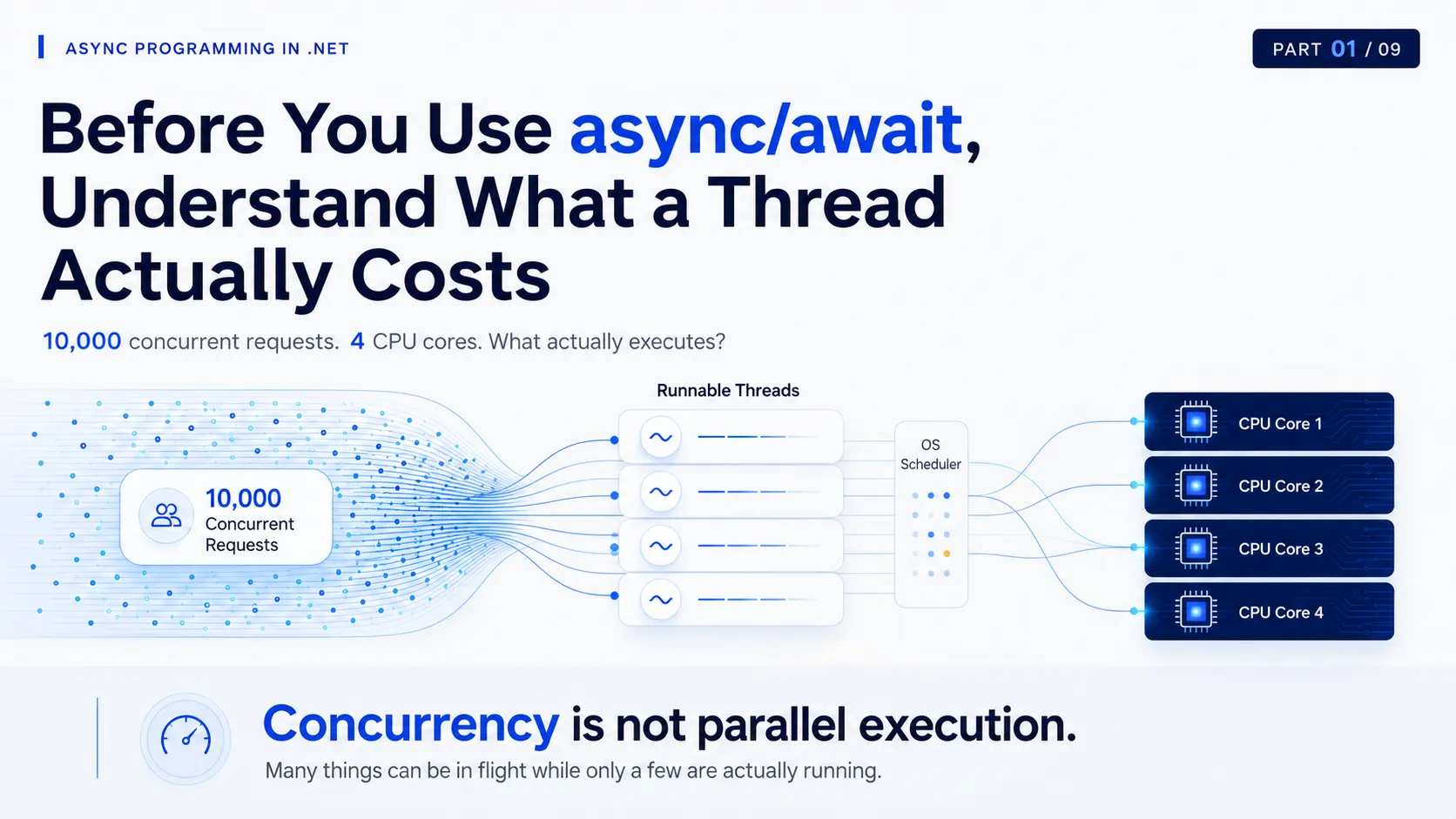
Your ASP.NET Core API receives 10,000 concurrent requests.
Your server has 4 CPU cores.
What happens next?
Do we need 10,000 threads?
Do all 10,000 requests execute at the same time?
And if the CPU is only 30% busy, does that mean the server still has plenty of capacity?
These questions sit underneath almost every discussion about async, await, ThreadPool starvation, blocking calls, and scalable backend systems.
Before touching async/await, we need one mental model:
What actually executes your code?
01 — Follow the Execution
Consider a normal method:
public decimal CalculateTotal(decimal price, int quantity)
{
    return price * quantity;
}
It looks simple.
But eventually, the processor must execute machine instructions corresponding to this code.
The simplified execution path is:
.NET code
   ↓
Thread
   ↓
Operating System Scheduler
   ↓
CPU Core
That distinction matters.
An HTTP request is not a CPU execution resource.
A Task is not a CPU core.
A method does not execute independently.
For your code to make progress, a thread must execute instructions, and the operating system must schedule that thread onto CPU execution capacity.
That is our starting point.
What does the process own?
When your application starts, the operating system creates a process.
The process contains things such as:
- virtual address space
- loaded code and libraries
- managed heap
- runtime resources
- operating-system handles
- one or more threads
Threads inside the same process share many of these resources.
But each thread also carries its own execution state.
For example:
- its stack
- CPU register state
- current instruction position
- scheduling state
- operating-system bookkeeping
That is why a thread is more than an identifier you see in a profiler.
It is a real execution resource with real cost.
The stack matters
Imagine this call chain:
ProcessOrder();which calls:
ValidateOrder();which calls:
CalculatePrice();Conceptually, the executing thread maintains enough state to return through that chain.
┌───────────────────────┐
│ CalculatePrice()      │
├───────────────────────┤
│ ValidateOrder()       │
├───────────────────────┤
│ ProcessOrder()        │
└───────────────────────┘
The exact stack representation depends on the runtime and JIT optimizations.
The important idea is simpler:
Every thread carries execution state.
Creating threads therefore has a cost.
Keeping large numbers of threads alive has a cost.
Scheduling large numbers of runnable threads has a cost.
We will come back to that.
02 — Threads Are Not CPU Cores
Suppose the server has:
4 CPU cores
and the application currently has:
100 runnable threads
How many threads can truly execute at the same instant?
Not 100.
The hardware still has finite execution capacity.
Ignoring technologies such as simultaneous multithreading for the moment, the important model is:
Many runnable threads
        ↓
OS scheduler
        ↓
Limited CPU execution capacity
At one moment:
Core 1 → Thread A
Core 2 → Thread B
Core 3 → Thread C
Core 4 → Thread D
A little later:
Core 1 → Thread E
Core 2 → Thread F
Core 3 → Thread C
Core 4 → Thread H
The operating system continually decides which runnable threads receive CPU time.
This is scheduling.
And it gives us one of the most important rules in concurrency:
Concurrency is not the same as parallel execution.
Many operations can be in progress.
Only a limited number can physically execute instructions at a given instant.
Mental Model
10,000 requests can exist at the same time without 10,000 things executing on the CPU at the same time.
03 — What the Scheduler Is Actually Doing
Your application does not normally decide:
Run Thread A on Core 2 for exactly 4 milliseconds.
The operating system scheduler decides when runnable threads receive execution time.
A running thread may:
- continue using the CPU
- be preempted so another thread can run
- stop being runnable because it is waiting for something
Consider one CPU core:
TIME ─────────────────────────────────────────→

[ Thread A ][ Thread B ][ Thread A ][ Thread C ]
To the application, several threads appear to be progressing.
But a single core may simply be switching between them.
This is where context switching appears.
Conceptually:
Thread A running
      ↓
save Thread A execution state
      ↓
scheduler selects Thread B
      ↓
restore Thread B execution state
      ↓
Thread B continues
Context switching is completely normal.
Modern operating systems are designed to do it efficiently.
But it is not free.
Switching execution has bookkeeping cost.
It can also reduce CPU cache locality because Thread B may need different instructions and different data from Thread A.
So this intuition is dangerous:
More threads
=
More performance
For CPU-heavy work, adding runnable threads far beyond the machine’s execution capacity can create:
More competition
      ↓
More scheduling
      ↓
More context switching
      ↓
Less useful work per unit of CPU time
The hardware did not become faster.
We simply created more things competing for it.
04 — The Important Part: What Happens When a Thread Blocks?
Now imagine this synchronous database call:
var customer = database.GetCustomer(customerId);The application prepares a database request.
It sends the request.
Then the database may spend 50 ms executing the query.
During most of those 50 ms, what useful CPU work does this application thread have to perform for that request?
Almost none.
The application is waiting.
The timeline should be read like this:
Application Thread
│
├──── CPU work ────┤──────── WAITING ────────┤── CPU work ──
                  SQL sent                 response arrives

Database
                   ├──── query / I/O ────────┤
The database may be busy.
The network may be busy.
But the application thread is not doing useful computation.
And here is the subtle but extremely important point:
A blocked thread does not necessarily consume a CPU core continuously.
The operating system can stop scheduling it while it waits.
So blocking does not automatically mean high CPU.
But that does not make blocking free.
The thread still exists.
Its execution state still exists.
And while that synchronous call is waiting, that thread is occupied by that operation instead of being available for other application work.
This is the idea that matters for scalable servers.
05 — Why Low CPU Can Still Mean a Sick Server
Imagine your API normally calls a database that responds in:
20 ms
Then something changes.
The same database starts responding in:
800 ms
Traffic does not change.
Your code does not change.
CPU might still look acceptable.
But every synchronous request now occupies its executing thread much longer.
Instead of:
Thread
CPU → wait 20 ms → continue
you now have:
Thread
CPU → wait 800 ms → continue
Do that across enough concurrent requests and the system starts behaving very differently.
A common failure chain looks like this:
Slow downstream dependency
          ↓
requests wait longer
          ↓
threads remain occupied longer
          ↓
available execution capacity drops
          ↓
new work waits
          ↓
request queues grow
          ↓
latency increases
          ↓
timeouts begin
          ↓
clients retry
          ↓
even more load
This can create a feedback loop.
And this is why this dashboard statement is dangerous:
“CPU is only 35%. We still have plenty of capacity.”
Maybe.
But CPU is not the only resource that determines whether your server can accept more work.
Production Lens
Low CPU does not prove the application is healthy.
A service can have moderate CPU while request latency explodes because too much execution capacity is tied up waiting on slow dependencies.
Different kinds of waiting
At a conceptual level, a thread may be:
RUNNING
   ↓
currently executing instructions

RUNNABLE
   ↓
ready to execute but waiting for CPU time

WAITING / BLOCKED
   ↓
cannot continue until something happens
The exact state names differ between operating systems and diagnostic tools.
But the distinction is useful.
A thread can wait for:
- database I/O
- HTTP/network I/O
- disk operations
- locks
- synchronization primitives
- another thread
- timers
- external resources
And there is an important difference between:
waiting for CPU
and
waiting for I/O.
CPU-Bound vs I/O-Bound
Suppose Thread A is doing this:
calculate
calculate
calculate
calculate
calculate
Maybe it is:
- compressing data
- calculating hashes
- processing an image
- serializing a huge payload
- executing an expensive algorithm
This is CPU-bound work.
More CPU execution time makes it progress.
Now compare that with:
send HTTP request
      ↓
wait
      ↓
wait
      ↓
wait
      ↓
receive response
This is primarily I/O-bound work.
Giving the waiting thread more CPU does not make the remote service respond faster.
That distinction is one of the foundations of asynchronous programming.
We will explore it deeply in Part 3.
06 — So Why Not Just Create More Threads?
At first, the solution seems obvious.
If 100 threads are blocked, create 100 more.
And for a while, extra threads can indeed allow more work to continue.
But threads have several costs.
Memory
Each thread needs its own stack and operating-system/runtime state.
The exact memory behavior depends on the platform and runtime, so a fixed number like “every thread costs exactly X MB” is usually misleading.
But the principle is clear:
More threads
→
more memory and runtime state to manage
Scheduling
If the workload is CPU-bound and you have 4 cores:
4 CPU cores
+
4 CPU-heavy runnable threads
may already keep the CPU busy.
Creating:
500 CPU-heavy threadsdoes not create 500 cores.
It creates 500 competitors for the same hardware.
Context switching
More runnable threads can increase scheduling pressure and switching.
The problem is not that context switching exists.
The problem is assuming an unlimited number of runnable threads has no cost.
Operational complexity
Large numbers of blocked or contending threads can contribute to:
- rising latency
- thread starvation
- request queues
- timeout cascades
- lock contention
- memory pressure
- unstable tail latency
And these failures often appear only under meaningful concurrency.
The endpoint may work perfectly with five users.
The architecture problem appears at 500.
07 — Return to the 10,000 Requests
Now we can revisit the opening question.
Your ASP.NET Core application receives:
10,000 concurrent requests
Does it require 10,000 threads?
No.
And more importantly, we should not want one dedicated operating-system thread to remain tied to every request for the full lifetime of that request.
At any given moment, those requests may be in very different states.
Some are:
- executing CPU work
- waiting for a database
- waiting for HTTP
- waiting for storage
- queued
- ready to resume
- completing
Concurrent requests do not equal simultaneously executing instructions.
The hardware still decides the physical limit of parallel execution.
The Model to Remember
Think about server work like this:
                    ┌──────────── CPU WORK ────────────┐
                    │                                  │
Request → Work → Thread → OS Scheduler → CPU Core
                    │
                    │
                    └────── I/O / EXTERNAL WAIT ──────→
And remember this distinction:
The request is the work.
The thread is one resource used to execute parts of that work.
Those two things are not the same.
Design Review Question
When this operation cannot make progress because it is waiting for a database, API, file, queue, or another external resource:
what application resource are we holding while we wait?
That is a much more useful question than simply asking:
“Is this code fast?”
The Question That Leads to Async
We now know three things:
- threads are real execution resources
- creating more threads does not create more CPU capacity
- synchronously waiting for I/O can leave threads occupied while they have no useful computation to perform
So the next question becomes obvious:
If constantly creating threads is expensive, how does .NET efficiently manage a reusable set of threads for application work?
That is where the .NET ThreadPool enters the story.
And it is the missing layer we need before discussing asynchronous I/O.
Next
Part 2 — The .NET ThreadPool: Why Your API Doesn’t Create a Thread Per Request
We will look at:
- why .NET reuses threads
- worker threads
- work queues
- how new threads are introduced
- what happens during traffic spikes
- why blocking becomes dangerous
- what ThreadPool starvation looks like in production
Only after that will we move into I/O and finally async/await.