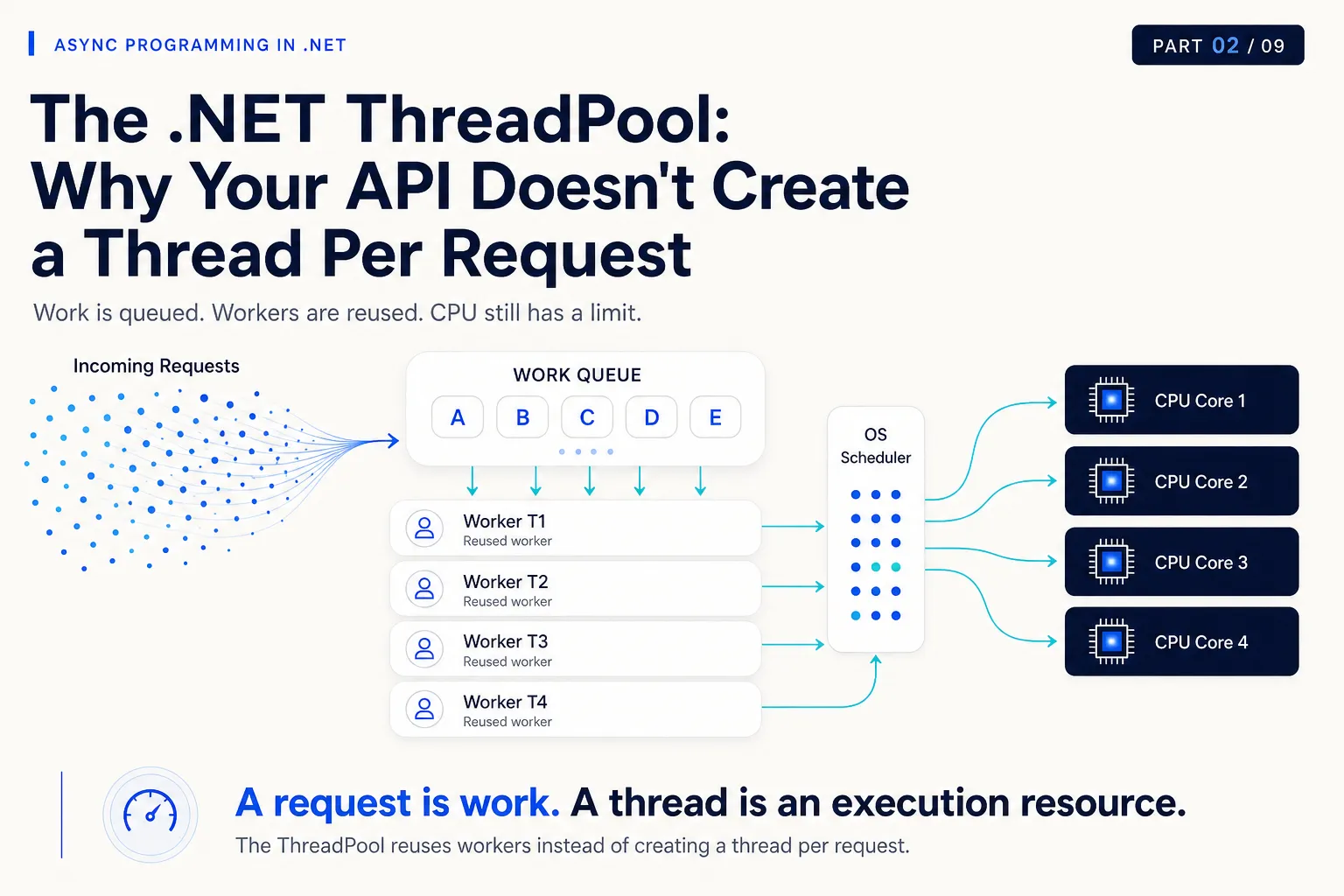
Your API normally responds in 80 ms.
Traffic increases.
Latency becomes:
300 ms.
Then:
800 ms.
Then:
2 seconds.
You open your monitoring dashboard.
CPU: 42%
Memory: normal
Database CPU: normal
Pods: healthy
Yet requests are taking seconds to complete.
So what are they waiting for?
Part 1 gave us this execution model:
Work
  ↓
Thread
  ↓
OS Scheduler
  ↓
CPU Core
But there is an important layer missing between application work and operating-system threads.
In most .NET applications, we do not constantly create and destroy a new operating-system thread every time some work needs to execute.
.NET gives us something in the middle:
The ThreadPool.
The ThreadPool is one of the reasons a modern .NET server can process huge amounts of work without creating a dedicated thread for every request.
But it can also become one of the reasons your application suddenly becomes slow under load.
To understand why, we need to answer a few questions:
- Why does .NET reuse threads?
- What exactly is a worker thread?
- Where does work wait before a worker can execute it?
- When does the runtime introduce more threads?
- What changes during a traffic spike?
- Why is blocking so dangerous?
- And what does ThreadPool starvation really mean?
Let’s build the model.
01 — Why Not Create a New Thread Every Time?
Imagine we built an API using this mental model:
Request 1
   ↓
Create Thread 1

Request 2
   ↓
Create Thread 2

Request 3
   ↓
Create Thread 3

...

Request 10,000
   ↓
Create Thread 10,000
Every incoming request gets its own operating-system thread.
It sounds simple.
It is also expensive.
From Part 1, we already know that a thread carries execution state.
A thread needs things such as:
- stack space
- operating-system state
- scheduling state
- CPU register state
- runtime bookkeeping
Creating threads has a cost.
Destroying them has a cost.
Scheduling too many runnable threads has a cost.
And creating 10,000 threads does not magically create 10,000 CPU cores.
So instead of repeatedly doing this:
Create thread
      ↓
Run one piece of work
      ↓
Destroy thread

Create another thread
      ↓
Run another piece of work
      ↓
Destroy thread
.NET can reuse threads that already exist.
Conceptually:
                   WORK

           A      B      C      D
           │      │      │      │
           ▼      ▼      ▼      ▼

              THREADPOOL

           T1     T2     T3     T4

           │      │      │      │
           ▼      ▼      ▼      ▼

          execute application work

           │      │      │      │
           └──────┴──────┴──────┘
                     │
              threads reused
When one worker finishes its current work, it can later execute another work item.
That is much cheaper than treating an operating-system thread as disposable infrastructure for every small operation.
Mental Model
The ThreadPool does not create more CPU.
It manages and reuses threads so application work can be executed efficiently on the CPU capacity you already have.
02 — What the ThreadPool Actually Sits Between
Let’s extend the model from Part 1.
Before:
Work
  ↓
Thread
  ↓
OS Scheduler
  ↓
CPU
Now:
Application Work
       ↓
.NET ThreadPool
       ↓
Worker Thread
       ↓
OS Scheduler
       ↓
CPU Core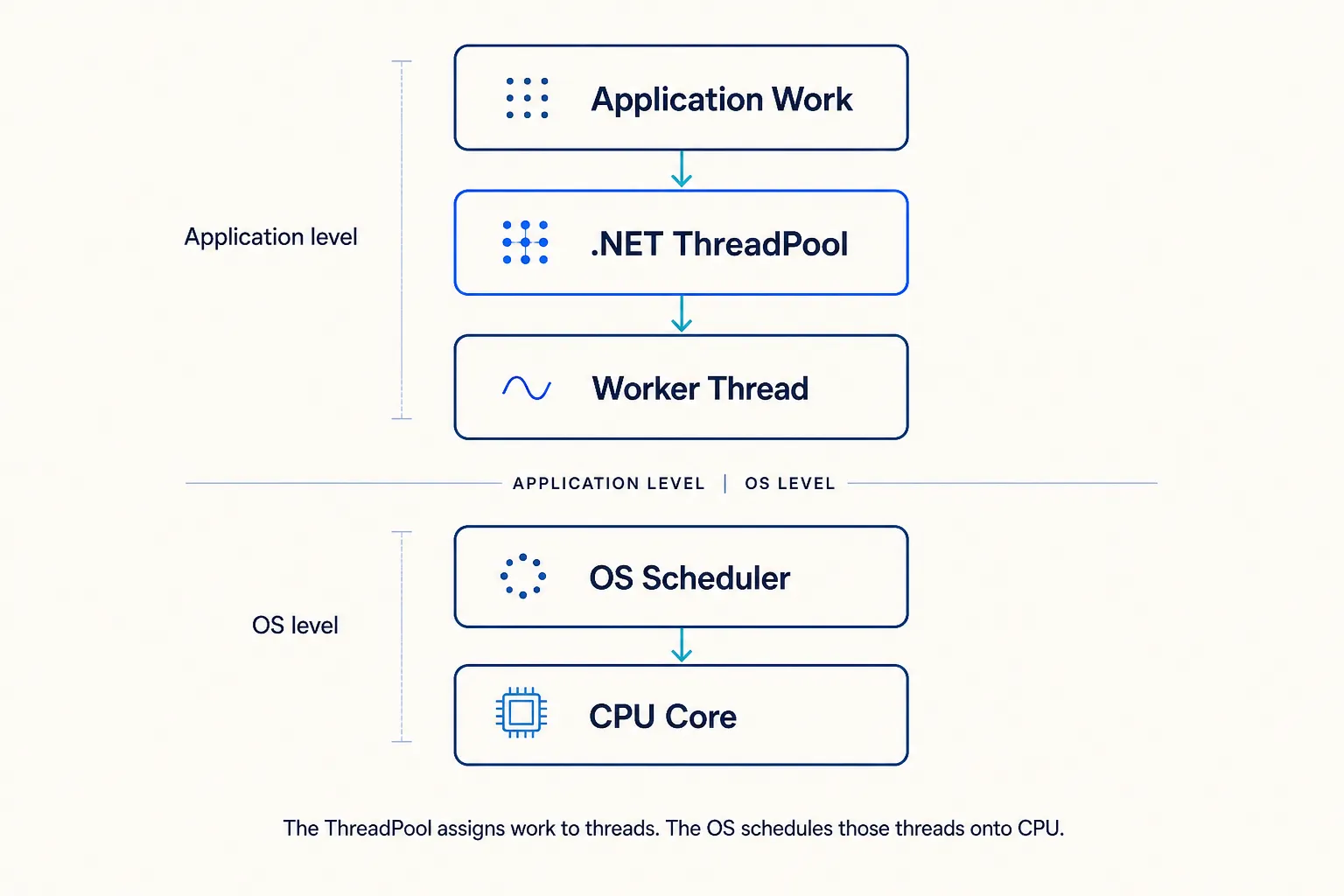
This distinction is important because two different schedulers are involved in different responsibilities.
The ThreadPool decides how managed application work is assigned to its worker threads.
The operating system decides when those threads actually receive CPU execution time.
Think about it this way:
                APPLICATION LEVEL

                     Work
                      │
                      ▼
               .NET ThreadPool
                      │
                worker thread
                      │
──────────────────────┼──────────────────────
                      │
                 OS LEVEL
                      │
                      ▼
                OS Scheduler
                      │
                      ▼
                   CPU Core
The ThreadPool cannot tell the CPU:
Execute this C# request right now on Core 3.
It manages threads.
The OS schedules those threads.
That difference becomes important when diagnosing performance problems.
What Is a Worker Thread?
A ThreadPool worker thread is an operating-system thread managed and reused by the .NET runtime for executing application work.
A simplified lifecycle looks like:
Worker T17
    │
    ├── execute Work A
    │
    ├── finish
    │
    ├── available again
    │
    ├── execute Work B
    │
    ├── finish
    │
    └── execute Work C
The same thread can execute many unrelated pieces of work over its lifetime.
This immediately gives us a better mental model for APIs.
Avoid thinking:
Request
=
Thread
Instead:
Request
   ↓
produces work that needs execution
   ↓
ThreadPool worker executes that work
A request is business/application work.
A thread is an execution resource.
They are not the same thing.
One Request Does Not Own a Worker Forever
This distinction will become even more important later in the series.
For now, the key point is:
ASP.NET Core does not need to create a brand-new dedicated operating-system thread for every incoming HTTP request.
Request-processing work is executed using available runtime execution resources such as ThreadPool workers.
That worker is not conceptually the identity of the request.
It is simply the thread currently executing some part of the work.
We will see why that distinction becomes extremely powerful once we reach asynchronous I/O.
But not yet.
First, we need to understand what happens when there is more work than immediately available workers can execute.
03 — Work Doesn’t Disappear When All Workers Are Busy
Suppose work arrives faster than workers can complete it.
What happens?
The ThreadPool needs somewhere to keep pending work.
Conceptually:
Incoming Work

 A   B   C   D   E   F   G   H
 │   │   │   │   │   │   │   │
 ▼   ▼   ▼   ▼   ▼   ▼   ▼   ▼

┌────────────────────────────────┐
│            WORK QUEUE          │
│                                │
│   E    F    G    H             │
└───────────────┬────────────────┘
                │
       ┌────────┼────────┐
       ▼        ▼        ▼

      T1       T2       T3
    Worker   Worker   Worker
Workers complete work and pick up more work.
The real .NET ThreadPool implementation is more sophisticated than one giant queue.
Depending on how work is scheduled, the runtime can use shared queues, per-thread local queues, and work-stealing behavior.
We do not need to turn this article into CLR source-code archaeology.
The production mental model we need is:
Work can be queued while waiting for ThreadPool execution capacity.
And that gives us another resource to think about:
queue time.
A request can be slow even before the code responsible for processing it gets enough execution time.
Production Lens
Response time is not always just:
your code execution time + database timeUnder pressure, it can also include time waiting for execution capacity.
A Simple Healthy State
Imagine four workers.
WORK QUEUE

[ A ][ B ]


WORKERS

T1 → working
T2 → working
T3 → working
T4 → working
T1 finishes.
It takes A.
WORK QUEUE

[ B ]


WORKERS

T1 → A
T2 → working
T3 → working
T4 → working
Then T3 finishes and takes B.
The queue stays small.
Work completes quickly.
Nothing interesting happens.
This is roughly what you hope to see during healthy operation:
Work arrives
     ↓
Worker becomes available
     ↓
Work begins quickly
     ↓
Work finishes
     ↓
Worker becomes reusable
Now let’s increase the pressure.
04 — What Happens During a Traffic Spike?
Suppose your service normally handles:
200 requests / secondThen a campaign, retry storm, batch job, or downstream event causes:
2,000 requests / secondThe workload suddenly changes.
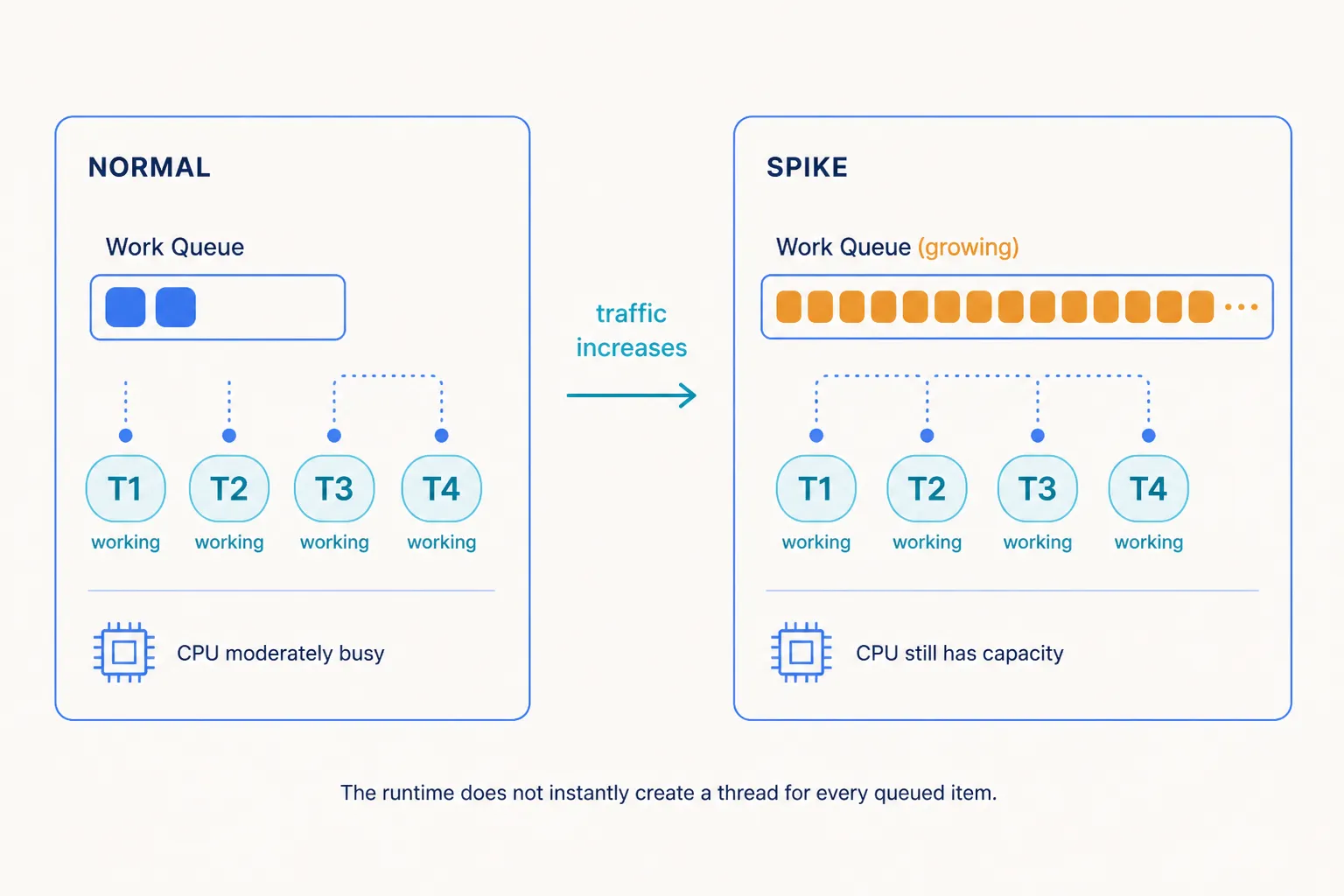
At first, the system may look something like this:
NORMAL

QUEUE
[ ][ ]

WORKERS
T1  T2  T3  T4

CPU
moderately busy
Then:
SPIKE

QUEUE
[ ][ ][ ][ ][ ][ ][ ][ ][ ][ ][ ][ ][ ]...

WORKERS
T1  T2  T3  T4

CPU
still has capacity
There is now more pending work than existing workers can process immediately.
The ThreadPool can respond by introducing additional workers.
But there is a very important design principle here:
The runtime should not react to every temporary burst by instantly creating hundreds or thousands of operating-system threads.
Why not?
Because the runtime does not yet know whether:
- the spike will disappear immediately
- current workers are about to finish
- the machine is already CPU-saturated
- adding threads will improve throughput
- adding threads will create more contention
The ThreadPool therefore adapts.
It observes workload behavior and adjusts worker capacity over time.
Why Doesn’t .NET Just Add 500 Threads Immediately?
Imagine four CPU cores running CPU-heavy work.
Now 500 work items arrive.
Option A:
Create 500 worker threads immediatelyBut we still have:
4 CPU coresWe did not create more computational power.
We mostly created more runnable threads competing for the same CPU.
So the runtime has to balance two bad extremes.
Too few workers
Work sits in queue
      ↓
CPU may be underutilized
      ↓
throughput suffers
Too many workers
Too many runnable threads
      ↓
more scheduling competition
      ↓
more context switching
      ↓
more contention
      ↓
throughput can suffer
The ThreadPool therefore tries to find a worker count that produces useful throughput for the current workload.
This behavior is adaptive rather than simply:
1 queued item
=
1 new thread
Minimum Threads Does Not Mean “Create These Threads at Startup”
This is worth mentioning because it causes confusion.
You may see APIs such as:
ThreadPool.GetMinThreads(...)
ThreadPool.SetMinThreads(...)
It is easy to interpret the minimum as:
My process always starts with exactly this many active worker threads.
That is not the right mental model.
ThreadPool threads are created on demand.
The minimum worker setting influences how the pool reacts as demand grows; it is not simply a command to eagerly create and permanently maintain that exact number of running workers.
This distinction matters when somebody tries to “fix” production latency by blindly increasing minimum ThreadPool threads.
We’ll return to that shortly.
05 — Blocking Changes the Entire Picture
This is where Part 1 becomes important.
Consider four workers processing short CPU work:
T1 → work → finish → reusable
T2 → work → finish → reusable
T3 → work → finish → reusable
T4 → work → finish → reusable
The workers turn over quickly.
Now change the workload.
Each request performs synchronous network or database operations.
T1 → work → WAIT FOR DB ─────────────────────
T2 → work → WAIT FOR DB ─────────────────────
T3 → work → WAIT FOR HTTP ───────────────────
T4 → work → WAIT FOR DB ─────────────────────
Meanwhile:
WORK QUEUE

[A][B][C][D][E][F][G][H][I][J]...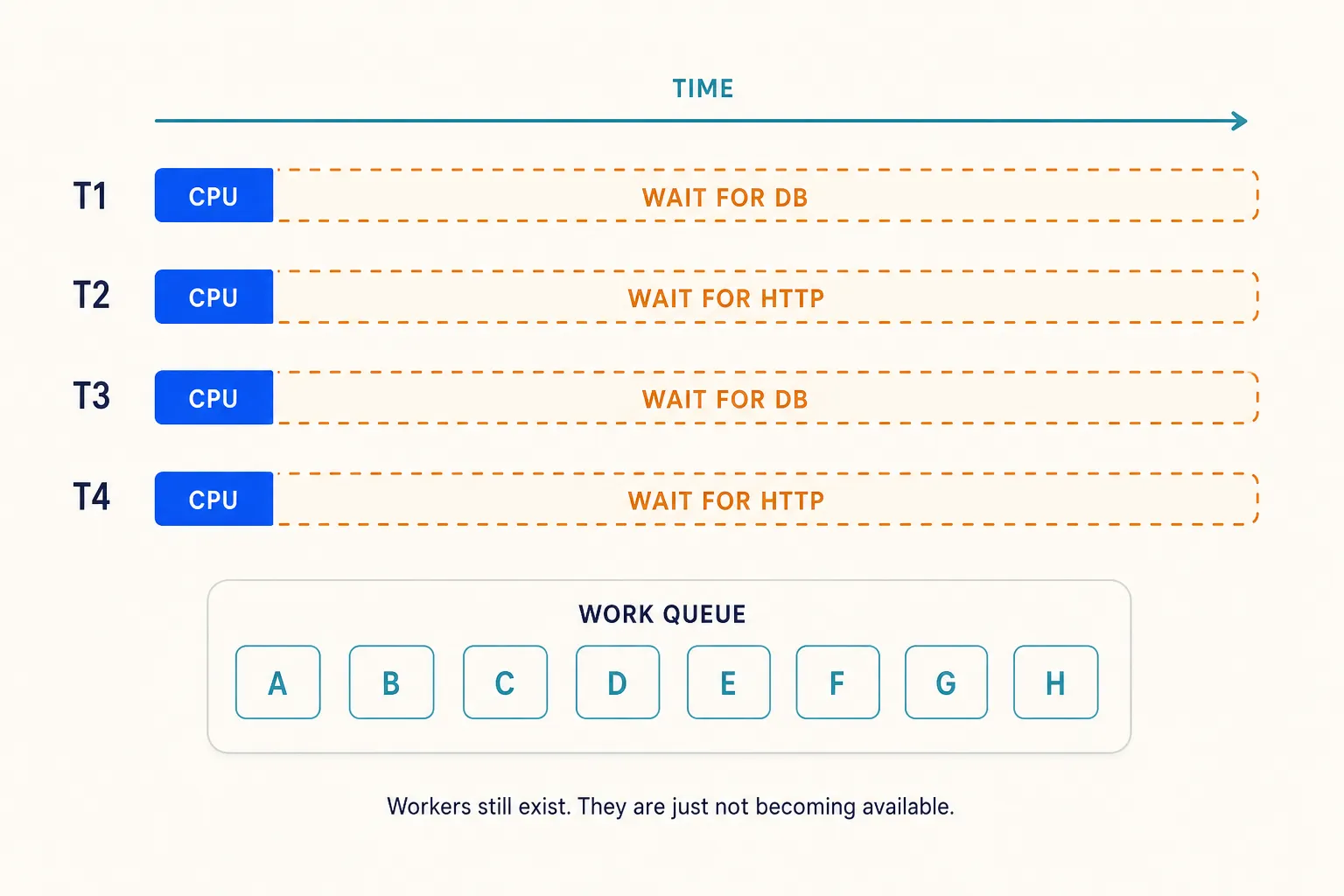
This is the key idea:
The worker threads still exist.
They are simply occupied by operations that cannot currently make progress.
From the ThreadPool’s perspective, there is still pending application work.
But existing workers are not becoming available quickly enough.
That changes the throughput characteristics completely.
Why This Can Be Worse Than CPU-Heavy Work
Imagine CPU-heavy operations that each take 5 ms.
Workers continuously finish:
T1 ████ finish → next
T2 ████ finish → next
T3 ████ finish → next
T4 ████ finish → next
Now imagine synchronous database calls taking 2 seconds:
T1 ██│──────────────────────────── WAIT
T2 ██│──────────────────────────── WAIT
T3 ██│──────────────────────────── WAIT
T4 ██│──────────────────────────── WAIT
CPU usage can actually be lower in the second case.
And that can fool you.
You look at monitoring:
CPU      35%
Memory   fine
and assume:
We have plenty of capacity.
But pending work does not care that the CPU graph looks comfortable.
It needs a worker thread to execute.
And existing workers may be spending most of their lifetime blocked.
Mental Model
A ThreadPool problem can exist even when the CPU is not saturated.
The bottleneck may be available worker execution capacity, not raw CPU capacity.
06 — ThreadPool Starvation
Now we can define the production problem properly.
ThreadPool starvation occurs when the pool does not have enough available worker threads to process pending work in a timely way.
One common cause is blocking.
Imagine:
Incoming Requests
        │
        │
        ▼
┌───────────────────────┐
│       WORK QUEUE      │
│                       │
│ A B C D E F G H I J…  │
└───────────┬───────────┘
            │
            ▼

T1     BLOCKED
T2     BLOCKED
T3     BLOCKED
T4     RUNNING
T5     BLOCKED
T6     BLOCKED
New work keeps arriving.
Existing workers are not becoming reusable quickly enough.
Pending work waits.
The runtime detects demand and introduces additional workers.
But recovery takes time.
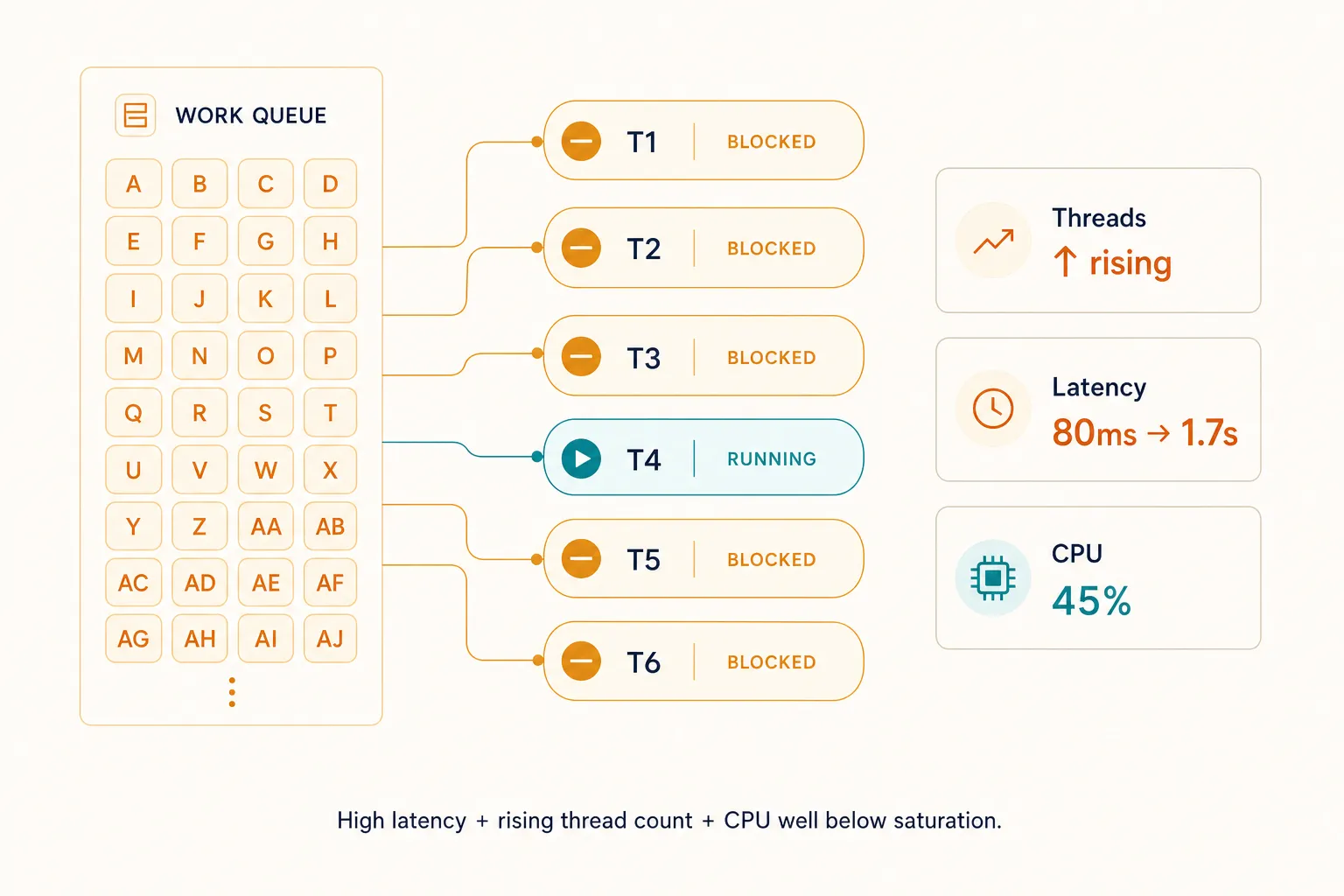
The production behavior can look like this:
Blocked workers
       ↑
       │
Pending work
       ↑
       │
Queue delay
       ↑
       │
Request latency
       ↑
While at the same time:
CPU
35% — 50%
That combination is one of the reasons starvation can be confusing.
Starvation Is Not the Same as CPU Saturation
These are different failure modes.
CPU Saturation
CPU
████████████████████ 100%

Threads want to run
         ↓
CPU cannot execute them quickly enough
ThreadPool Starvation
CPU
████████░░░░░░░░░░░ 40%

Many workers
blocked / occupied
         ↓
pending work waits
for execution capacity
Both can cause high latency.
But the root cause is different.
And therefore the fix may be completely different.
What Does Starvation Look Like in Production?
Imagine the following pattern.
At 10:00:00:
Requests/sec    200
Latency         80 ms
Thread count    stable
Queue           ~0
CPU             35%
Traffic increases.
At 10:00:10:
Requests/sec    600
Latency         300 ms
Thread count    rising
Queue           growing
CPU             40%
At 10:00:30:
Requests/sec    600
Latency         1.7 sec
Thread count    still rising
Queue           high
CPU             45%
Nothing in that picture says:
CPU = 100%But your users are already feeling the incident.
This is why production diagnostics should not stop at CPU and memory.
Useful ThreadPool signals include:
- ThreadPool thread count
- pending/queued work
- completed work rate
- request latency
- CPU usage
- thread stacks / wait behavior
On current .NET versions, runtime metrics expose ThreadPool signals such as thread count, queue length, and completed work items.
But the metric is only the beginning.
If the pool is struggling because threads are blocked, the real question is:
What are those threads doing?
That is where stack traces and runtime traces become valuable.
Production Lens
A useful starvation pattern to investigate is:
request latency rising + ThreadPool thread count growing + CPU significantly below saturation
A growing work queue can make the diagnosis even stronger.
This does not prove the root cause by itself—but it tells you where to investigate.
07 — The Dangerous Feedback Loop
Starvation can interact badly with the rest of your system.
Imagine the root problem is a slow database.
DATABASE SLOWER
      ↓
requests block workers longer
      ↓
ThreadPool pressure increases
      ↓
runtime adds more workers
      ↓
more requests execute concurrently
      ↓
more database calls
      ↓
DB connection pool pressure
      ↓
database gets even slower
Now add request timeouts.
Latency ↑
    ↓
Timeouts ↑
    ↓
Clients retry
    ↓
Traffic ↑
Now the original problem has become a feedback loop.
                 SLOW DEPENDENCY
                       │
                       ▼
              WORKERS BLOCK LONGER
                       │
                       ▼
               QUEUED WORK GROWS
                       │
                       ▼
                LATENCY INCREASES
                       │
                 ┌─────┴─────┐
                 ▼           ▼
             TIMEOUTS    MORE THREADS
                 │           │
                 ▼           │
              RETRIES        │
                 │           │
                 └─────┬─────┘
                       ▼
                    MORE LOAD
                       │
                       └──────────► SLOW DEPENDENCY
This is why performance problems need to be diagnosed as systems, not isolated metrics.
08 — “Just Increase the ThreadPool Size”
Once starvation is suspected, a common reaction is:
ThreadPool.SetMinThreads(...);Increase the minimum.
Deploy.
Incident solved.
Maybe.
But be careful.
Increasing the minimum can sometimes reduce the time the runtime needs to react to workloads that genuinely require more workers.
It can be useful in specific workloads after measurement.
But it does not automatically solve the underlying problem.
Suppose the real issue is:
Synchronous slow DB callsYou increase ThreadPool worker availability.
Now:
More workers
     ↓
more concurrent DB calls
     ↓
more DB connections requested
     ↓
connection pool pressure
     ↓
database pressure
     ↓
possibly even worse latency
You moved the bottleneck.
You did not necessarily remove it.
Common Mistake
Do not treat
SetMinThreadsas the default fix for every starvation symptom.First determine why workers are not becoming available quickly enough.
Ask Better Questions
Instead of starting with:
How many ThreadPool threads should I configure?
Start with:
What is keeping the existing workers occupied?
Possibilities include:
- synchronous database calls
- synchronous HTTP calls
.Result.Wait()- blocking locks
- long-running CPU work
- expensive serialization
- file operations
- third-party synchronous SDKs
- contention
- work that should not live on the ThreadPool at all
Some of those belong to later articles.
The important lesson here is that thread count is often a symptom, not the root cause.
09 — A Traffic Spike Is Not Automatically Starvation
This distinction is important.
Suppose traffic suddenly increases.
The queue grows briefly.
The runtime introduces more workers.
Then:
queue      ↓
latency    normalizes
throughput ↑
threads    stabilize
That can simply be the ThreadPool adapting to increased demand.
Starvation becomes concerning when the pool struggles to supply worker capacity fast enough and application latency suffers.
Think in terms of behavior over time:
TEMPORARY ADAPTATION

Traffic ↑
   ↓
Queue ↑ briefly
   ↓
Workers adapt
   ↓
Throughput catches up
   ↓
Queue ↓
versus:
STARVATION

Traffic / blocking
       ↓
Workers occupied
       ↓
Queue ↑
       ↓
Threads keep increasing
       ↓
Latency remains poor
A single snapshot rarely tells the whole story.
Trends matter.
10 — What the ThreadPool Is Actually Optimizing
It is tempting to think:
The ThreadPool’s goal is to maximize the number of threads.
It is not.
More threads are only useful if they improve useful throughput.
Conceptually, the runtime is trying to navigate this tradeoff:
TOO FEW THREADS

CPU underused
work waits
throughput lower

          ↕ find useful balance

TOO MANY THREADS

contention
context switching
memory overhead
throughput can fall
The runtime uses adaptive heuristics to respond to the workload rather than treating thread count as a static magic number.
This is why the ThreadPool should usually be allowed to manage itself unless measurements demonstrate a real reason to tune it.
11 — Let’s Rebuild the Execution Model
Part 1 gave us:
WORK
 ↓
THREAD
 ↓
OS SCHEDULER
 ↓
CPU
Now we can make it more accurate.
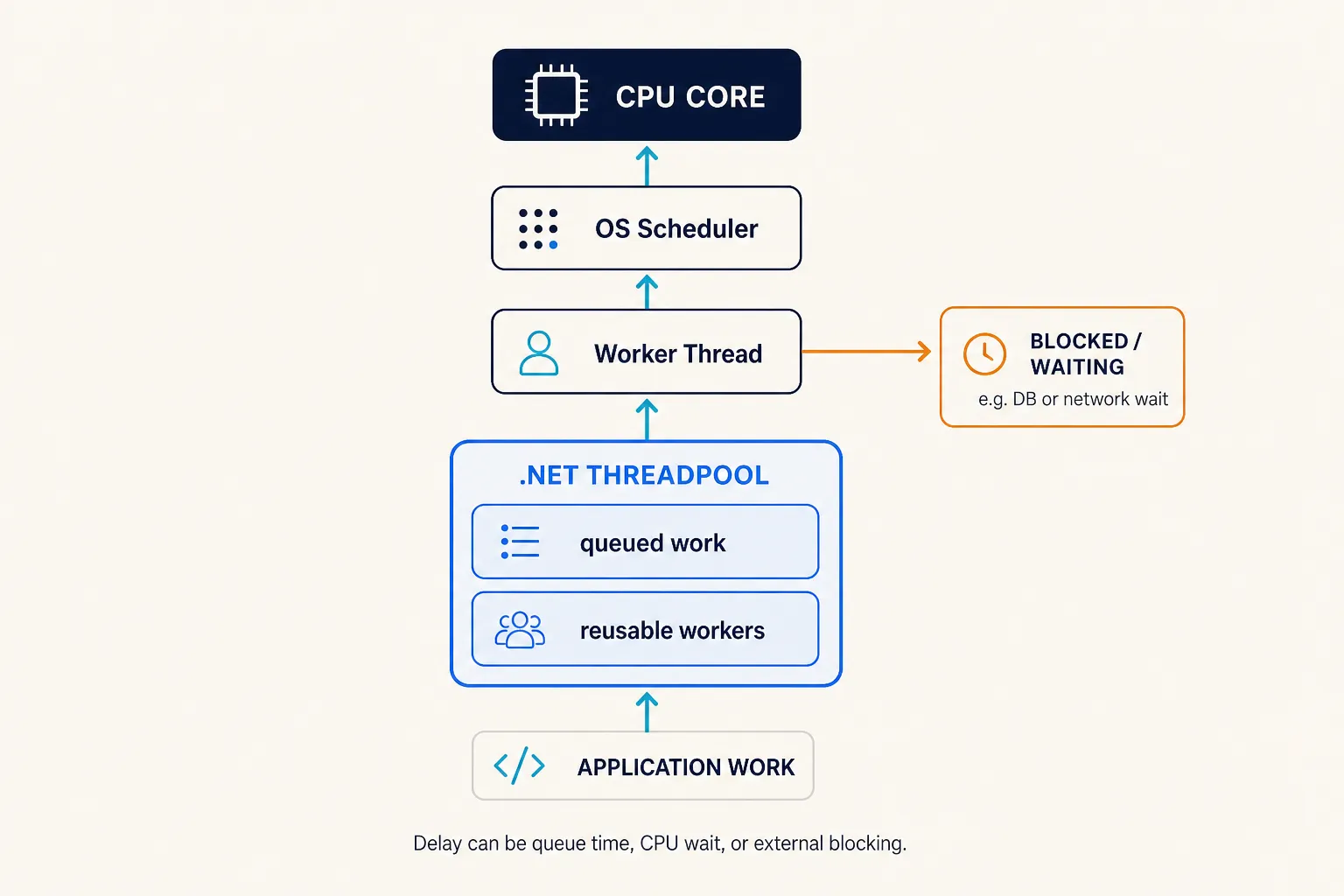
The Part 2 model is:
                         ┌───────────────┐
                         │   CPU CORE    │
                         └───────▲───────┘
                                 │
                          OS Scheduler
                                 ▲
                                 │
                         Worker Thread
                          ▲          │
                          │          │
                          │          └────► BLOCKED / WAITING
                          │
              ┌───────────┴───────────┐
              │      .NET THREADPOOL  │
              │                       │
              │   reusable workers    │
              │          ▲            │
              │          │            │
              │      queued work      │
              └───────────▲───────────┘
                          │
                          │
                     APPLICATION
                         WORK
There are now several different places where delay can appear.
The work may be waiting in the ThreadPool
Work
 ↓
QUEUE
A worker may be ready but waiting for CPU
Worker Thread
      ↓
OS Scheduler
      ↓
waiting for CPU time
A worker may be blocked waiting for something external
Worker Thread
      ↓
database / network / lock
      ↓
WAIT
Those are very different bottlenecks.
Calling all of them:
“The server is slow”
is not enough.
The Model to Remember
There are four ideas I want you to carry into the next article.
1. Your API does not need one new OS thread per request
.NET reuses ThreadPool worker threads.
Many pieces of work
       ↓
Reusable worker threads
2. Pending work can wait in queues
When execution demand exceeds immediately available worker capacity:
Work
 ↓
Queue
 ↓
Worker
Queue time becomes part of latency.
3. The runtime adapts worker capacity
The ThreadPool can introduce more workers when demand requires them.
But instantly creating a thread for every pending work item would create its own performance problems.
4. Blocking workers is dangerous
If workers spend too much time doing this:
Worker
  ↓
WAIT
WAIT
WAIT
new application work can struggle to find execution capacity.
That is how ThreadPool starvation becomes possible.
Design Review Question
Under peak traffic, if this operation blocks for one second:
how many ThreadPool workers could be occupied simultaneously, and what other work will be waiting behind them?
That question is more useful than:
Does the endpoint work?
Of course it works.
The real question is what happens when hundreds of copies of it run concurrently.
The Question That Leads to Part 3
We now have an uncomfortable situation.
Suppose a ThreadPool worker sends a request to a database.
The database takes 200 ms.
During most of those 200 ms, the worker has no useful CPU work to perform.
Yet with synchronous I/O, that worker remains tied to the operation while it waits.
So the obvious question becomes:
Does a thread really need to remain occupied while the database, network, or file system is doing the actual waiting?
That question changes everything.
To answer it properly, we first need to separate two completely different kinds of work:
work that needs the CPU
and
work that mostly waits for I/O.
That is Part 3.
Next
Part 3 — I/O Is Not CPU Work: The Idea You Need Before Understanding Async
We will look at:
- CPU-bound vs I/O-bound work
- what actually happens during a database call
- network and file I/O
- why waiting is different from computing
- synchronous I/O timelines
- asynchronous I/O timelines
- how the operating system can notify us when I/O completes
- why releasing a worker while waiting changes server scalability
Still no magic.
Still no memorizing async and await.
First, we understand the problem they were designed to help us solve.